
Download NTFS Data Recovery Application – Secure Windows Data Recovery Tool
Overview
NTFS Data Recovery Application is a full‑version program for Windows created by Drive Recovery Software, positioned under the “Backup & Cloud Storage” category. In today’s digital environment, accidental deletions, corrupted partitions, and sudden system crashes are common causes of data loss, especially on NTFS‑formatted drives. This application offers a straightforward, user‑friendly solution that empowers both novices and seasoned IT professionals to retrieve lost or deleted files quickly and safely.
By combining deep‑scan algorithms with an intuitive graphical interface, the tool can locate and restore a broad spectrum of file types, ranging from documents and photos to system files and multimedia assets. Whether you have inadvertently emptied the Recycle Bin, experienced a power failure during a write operation, or need to recover data after a virus attack, NTFS Data Recovery Application provides a reliable, step‑by‑step workflow that minimizes the risk of further damage. Its design focuses on security, ensuring that recovered data remains private and is not transmitted to external servers during the scanning process.
Moreover, the software receives regular updates to stay compatible with the latest Windows releases and to incorporate new file‑system handling techniques, making it a future‑proof choice for anyone who values data integrity on NTFS volumes.
Key Features & Compatibility
- Deep Scan Engine – Detects files even after format, partition loss, or severe corruption.
- Selective Recovery – Preview files before restoring, allowing you to choose only what you need.
- Wide File‑Type Support – Handles documents, images, videos, archives, system files, and more than 500 extensions.
- Secure, Offline Operation – All scans and recoveries are performed locally, protecting sensitive data.
- Batch Recovery – Restore multiple files or entire folders in a single operation to save time.
- Smart Filters – Narrow results by file type, size, or date to speed up the recovery process.
- Built‑in Diagnostic Tools – Verify disk health and identify bad sectors before attempting recovery.
- Automatic Update Service – Keeps the application aligned with the latest Windows updates and NTFS enhancements.
NTFS Data Recovery Application is built specifically for Microsoft Windows operating systems. It supports Windows 10, Windows 11, and legacy platforms such as Windows 8.1 and Windows 7 (64‑bit). The software leverages native Windows APIs to interact directly with NTFS volumes, ensuring maximum compatibility and performance.
While the primary focus is on desktop and laptop environments, the program can also be run on Windows Server editions (2012, 2016, 2019) for enterprise‑level recovery tasks. Users on virtual machines running Windows are equally supported, provided the virtual disk is presented as an NTFS volume. The application does not run on macOS, Linux, Android, or iOS, as it relies on Windows‑specific system calls and file‑system structures.
Installation, Usage & Pros/Cons
Installation Guide
Downloading NTFS Data Recovery Application is simple: visit the official Drive Recovery Software website, click the “Download Free Trial” button, and save the installer (a .exe file) to your computer. Run the installer with administrator privileges—this is required to access low‑level disk information. Follow the on‑screen wizard: accept the license agreement, choose an installation folder (the default location is recommended), and let the setup copy files and configure shortcuts. After installation, a reboot is not necessary; you can launch the program directly from the desktop icon.
Using the Tool Effectively
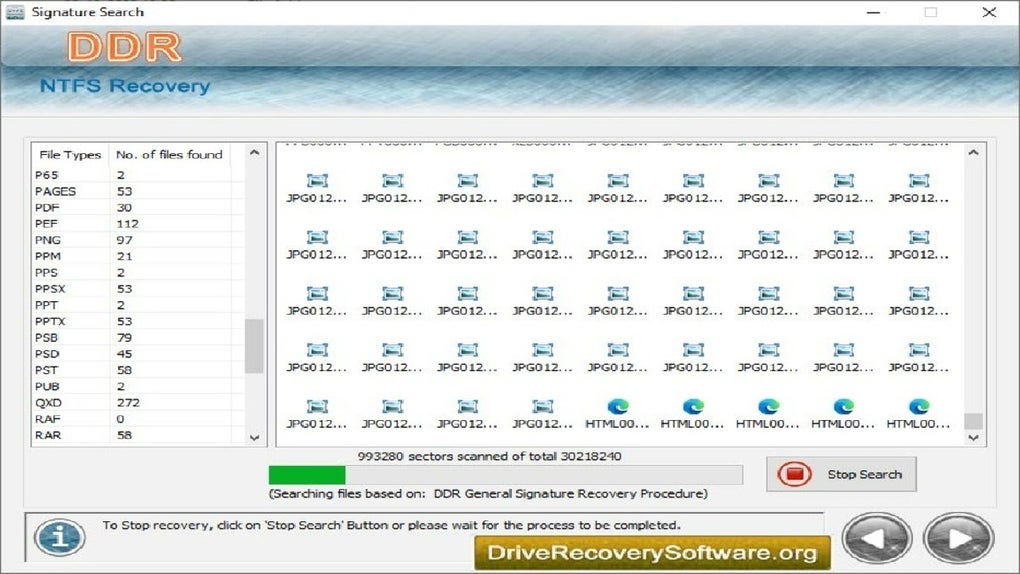
Upon launching the application, you are greeted with a clean dashboard that lists all detected NTFS drives. Select the drive you wish to scan and choose between “Quick Scan” (ideal for recently deleted files) or “Deep Scan” (for more extensive corruption scenarios). The scanning process runs in the background, displaying real‑time progress and estimated completion time.
Once the scan finishes, the results appear in a sortable list with file icons, names, sizes, and timestamps. Use the preview pane to open images, documents, or media files directly within the app—this confirms that the data is intact before recovery. To recover, select the desired files, choose a safe destination (preferably on a different physical drive to avoid overwriting), and click “Recover.” The software writes the recovered files to the chosen location while preserving original folder structures when possible.
Pros and Cons
- Pros
- Highly effective deep‑scan algorithm that finds files missed by many free tools.
- Intuitive UI that requires minimal technical knowledge.
- Secure offline operation protects privacy.
- Supports a broad array of file types and large storage capacities.
- Regular updates keep it compatible with the newest Windows releases.
- Cons
- Only available for Windows; no macOS or Linux version.
- Full version requires a one‑time purchase; the free trial limits the amount of data you can recover.
- Deep scans can be time‑consuming on very large drives (several hours).
Overall, NTFS Data Recovery Application earns a solid rating for its powerful recovery engine, ease of use, and commitment to data security. While the price point may deter casual users, professionals and small businesses will find the investment worthwhile.
Frequently Asked Questions
Can NTFS Data Recovery Application recover files after a full drive format?
Yes. The deep‑scan engine can locate file fragments on a formatted NTFS volume, provided the sectors have not been overwritten by new data. The success rate depends on how much the drive has been used since the format.
Is the recovered data encrypted or altered during the process?
No. The software works entirely offline and writes the recovered files exactly as they existed on the source disk. It does not modify or encrypt the data unless you choose to encrypt the output yourself.
Do I need to purchase a license to recover large volumes of data?
The free trial allows you to scan unlimited drives but limits the amount of data you can actually recover (typically up to 100 MB). To unlock unlimited recovery and advanced features, a one‑time license purchase is required.
Can the program be run from a USB stick on a non‑bootable PC?
Yes. NTFS Data Recovery Application offers a portable version that can be executed directly from a USB drive. This is useful for recovering data on systems that cannot start Windows normally.
How often does the software receive updates?
Drive Recovery Software releases major updates approximately every six months, with smaller security patches and compatibility fixes issued as needed. The built‑in updater notifies you automatically.
Conclusion & Call to Action
Data loss on NTFS drives can be stressful, but NTFS Data Recovery Application offers a dependable, secure, and easy‑to‑use solution for Windows users. Its deep‑scan capabilities, broad file‑type support, and offline processing make it a standout choice among recovery utilities. While the software is limited to the Windows ecosystem and requires a purchase for full functionality, the performance and peace of mind it delivers are well worth the investment for anyone who values their digital assets. If you’re ready to protect your files and restore lost data with confidence, download the free trial today, explore the interface, and consider upgrading to the full version for unlimited recovery power.
$49.99 – Click here to purchase the full license and start recovering your files instantly.







